Generate AI viral videos with Seedance and upload to TikTok, YouTube & Instagram

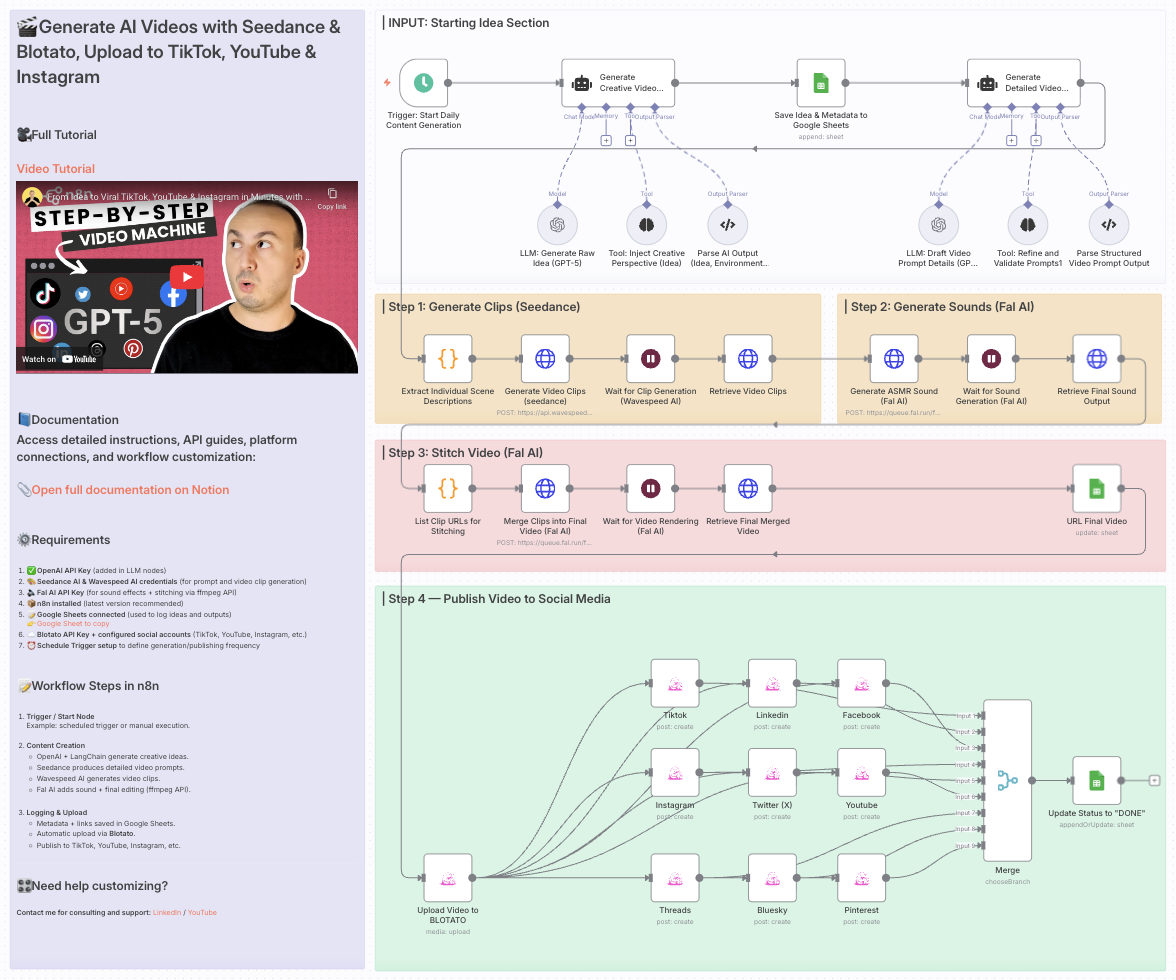
Generate AI videos with Seedance & Blotato, upload to TikTok, YouTube & Instagram
Who is this for?
This template is ideal for creators, content marketers, social media managers, and AI enthusiasts who want to automate the production of short-form, visually captivating videos for platforms like TikTok, YouTube Shorts, and Instagram Reels — all without manual editing or publishing.
What problem is this workflow solving?
Creating engaging videos requires:
- Generating creative ideas
- Writing detailed scene prompts
- Producing realistic video clips and sound effects
- Editing and stitching the final video
- Publishing across multiple platforms
This workflow automates the entire process, saving hours of manual work and ensuring consistent, AI-driven content output ready for social distribution.
What this workflow does
This end-to-end AI video automation workflow:
- Generates a creative idea using OpenAI and LangChain
- Creates detailed video prompts with Seedance AI
- Generates video clips via Wavespeed AI
- Generates sound effects with Fal AI
- Stitches the final video using Fal AI’s ffmpeg API
- Logs metadata and video links to Google Sheets
- Uploads the video to Blotato
- Auto-publishes to TikTok, YouTube, Instagram, and other platforms
Setup
- Add your OpenAI API key in the LLM nodes
- Set up Seedance and Wavespeed AI credentials for video prompt and clip generation
- Add your Fal AI API key for sound and stitching steps
- Connect your Google Sheets account for tracking ideas and outputs
- Set your Blotato API key and fill in the platform account IDs in the
Assign Social Media IDsnode - Adjust the Schedule Trigger to control when the automation runs
How to customize this workflow to your needs
- Change the AI prompts to target your niche (e.g., ASMR, product videos, humor)
- Add a Telegram or Slack step for video preview before publishing
- Tweak scene structure or video duration to match your style
- Disable platforms you don’t want by turning off specific HTTP Request nodes
- Edit the sound generation prompts for different moods or effects
📄 Documentation: Notion Guide
Need help customizing?
Generate AI Viral Videos with Seedance and Upload to TikTok, YouTube & Instagram
This n8n workflow automates the process of generating AI-powered viral video concepts from a Google Sheet, creating the videos using an external API (likely Seedance based on the directory name, though not explicitly in JSON), and then potentially preparing them for upload to social media platforms.
What it does
This workflow orchestrates a series of steps to automate video content creation:
- Triggers on Schedule: The workflow starts on a predefined schedule, ensuring regular content generation.
- Reads Data from Google Sheets: It fetches video ideas or prompts from a specified Google Sheet.
- Generates AI Content (via HTTP Request): For each entry from the Google Sheet, it makes an HTTP request to an external API (presumably Seedance) to generate video content. This step likely involves sending prompts or data to the AI video generation service.
- Processes AI Output:
- It uses an AI Agent (Langchain) to potentially interpret or refine the AI-generated content.
- A Structured Output Parser then extracts specific, structured data from the AI Agent's response, ensuring consistency.
- A Think Tool is also present, suggesting a step for internal reasoning or decision-making within the AI process.
- An OpenAI Chat Model is utilized, indicating that the workflow leverages a large language model to assist with content generation, refinement, or understanding.
- Merges Data: It combines the original data from Google Sheets with the processed AI-generated content.
- Waits for Processing: A
Waitnode is included, likely to pause the workflow, allowing time for external video generation processes to complete before proceeding. - Custom Code Execution: A
Codenode is present, enabling custom JavaScript logic to be executed. This could be for data manipulation, formatting, or preparing data for the next steps. - Placeholder for Upload: Although not explicitly defined in the provided JSON, the overall workflow name suggests that the generated content would then be uploaded to platforms like TikTok, YouTube, and Instagram. The
HTTP Requestnode could be used for this purpose in subsequent steps.
Prerequisites/Requirements
To use this workflow, you will need:
- n8n Instance: A running n8n instance.
- Google Sheets Account: Access to a Google Sheet containing your video ideas/prompts.
- External AI Video Generation Service: An API key and access to an AI video generation service (e.g., Seedance, as hinted by the directory name). This service will be called via the
HTTP Requestnode. - OpenAI API Key: For the
OpenAI Chat Modelnode to function. - Social Media Accounts: Accounts for TikTok, YouTube, and Instagram (and potentially their respective API credentials if direct uploads are intended).
Setup/Usage
- Import the workflow: Import the provided JSON into your n8n instance.
- Configure Google Sheets:
- Set up credentials for your Google Sheets account.
- Specify the Spreadsheet ID and Sheet Name from which the workflow should read data.
- Configure HTTP Request (AI Video Generation):
- Update the
HTTP Requestnode with the correct URL, API key, and payload structure for your chosen AI video generation service (e.g., Seedance).
- Update the
- Configure OpenAI Chat Model:
- Set up your OpenAI API credentials.
- Configure Schedule Trigger:
- Adjust the schedule in the
Schedule Triggernode to your desired frequency for generating videos.
- Adjust the schedule in the
- Review and Customize Code:
- Examine the
Codenode and modify the JavaScript logic as needed for any specific data transformations or preparations unique to your use case.
- Examine the
- Add Social Media Upload Nodes (if not already present):
- Extend the workflow with additional
HTTP Requestnodes or dedicated n8n nodes for TikTok, YouTube, and Instagram to handle the actual video uploads. This will require configuring their respective API credentials and payload structures.
- Extend the workflow with additional
- Activate the workflow: Once all configurations are complete, activate the workflow.
Related Templates
Automated YouTube video uploads with 12h interval scheduling in JST
This workflow automates a batch upload of multiple videos to YouTube, spacing each upload 12 hours apart in Japan Standard Time (UTC+9) and automatically adding them to a playlist. ⚙️ Workflow Logic Manual Trigger — Starts the workflow manually. List Video Files — Uses a shell command to find all .mp4 files under the specified directory (/opt/downloads/单词卡/A1-A2). Sort and Generate Items — Sorts videos by day number (dayXX) extracted from filenames and assigns a sequential order value. Calculate Publish Schedule (+12h Interval) — Computes the next rounded JST hour plus a configurable buffer (default 30 min). Staggers each video’s scheduled time by order × 12 hours. Converts JST back to UTC for YouTube’s publishAt field. Split in Batches (1 per video) — Iterates over each video item. Read Video File — Loads the corresponding video from disk. Upload to YouTube (Scheduled) — Uploads the video privately with the computed publishAtUtc. Add to Playlist — Adds the newly uploaded video to the target playlist. 🕒 Highlights Timezone-safe: Pure UTC ↔ JST conversion avoids double-offset errors. Sequential scheduling: Ensures each upload is 12 hours apart to prevent clustering. Customizable: Change SPANHOURS, BUFFERMIN, or directory paths easily. Retry-ready: Each upload and playlist step has retry logic to handle transient errors. 💡 Typical Use Cases Multi-part educational video series (e.g., A1–A2 English learning). Regular content release cadence without manual scheduling. Automated YouTube publishing pipelines for pre-produced content. --- Author: Zane Category: Automation / YouTube / Scheduler Timezone: JST (UTC+09:00)
 By Zane
Detect holiday conflicts & suggest meeting reschedules with Google Calendar and Slack
Who’s it for Remote and distributed teams that schedule across time zones and want to avoid meetings landing on public holidays—PMs, CS/AM teams, and ops leads who own cross-regional calendars. What it does / How it works The workflow checks next week’s Google Calendar events, compares event dates against public holidays for selected country codes, and produces a single Slack digest with any conflicts plus suggested alternative dates. Core steps: Workflow Configuration (Set) → Fetch Public Holidays (via a public holiday API such as Calendarific/Nager.Date) → Get Next Week Calendar Events (Google Calendar) → Detect Holiday Conflicts (compare dates) → Generate Reschedule Suggestions (find nearest business day that isn’t a holiday/weekend) → Format Slack Digest → Post Slack Digest. How to set up Open Workflow Configuration (Set) and edit: countryCodes, calendarId, slackChannel, nextWeekStart, nextWeekEnd. Connect your own Google Calendar and Slack credentials in n8n (no hardcoded keys). (Optional) Adjust the Trigger to run daily or only on Mondays. Requirements n8n (Cloud or self-hosted) Google Calendar read access to the target calendar Slack app with permission to post to the chosen channel A public-holiday API (no secrets needed for Nager.Date; Calendarific requires an API key) How to customize the workflow Time window: Change nextWeekStart/End to scan a different period. Holiday sources: Add or swap APIs; merge multiple regions. Suggestion logic: Tweak the look-ahead window or rules (e.g., skip Fridays). Output: Post per-calendar messages, DM owners, or create tentative reschedule events automatically.
 By Takuya Ojima
Automate Reddit brand monitoring & responses with GPT-4o-mini, Sheets & Slack
How it Works This workflow automates intelligent Reddit marketing by monitoring brand mentions, analyzing sentiment with AI, and engaging authentically with communities. Every 24 hours, the system searches Reddit for posts containing your configured brand keywords across all subreddits, finding up to 50 of the newest mentions to analyze. Each discovered post is sent to OpenAI's GPT-4o-mini model for comprehensive analysis. The AI evaluates sentiment (positive/neutral/negative), assigns an engagement score (0-100), determines relevance to your brand, and generates contextual, helpful responses that add genuine value to the conversation. It also classifies the response type (educational/supportive/promotional) and provides reasoning for whether engagement is appropriate. The workflow intelligently filters posts using a multi-criteria system: only posts that are relevant to your brand, score above 60 in engagement quality, and warrant a response type other than "pass" proceed to engagement. This prevents spam and ensures every interaction is meaningful. Selected posts are processed one at a time through a loop to respect Reddit's rate limits. For each worthy post, the AI-generated comment is posted, and complete interaction data is logged to Google Sheets including timestamp, post details, sentiment, engagement scores, and success status. This creates a permanent audit trail and analytics database. At the end of each run, the workflow aggregates all data into a comprehensive daily summary report with total posts analyzed, comments posted, engagement rate, sentiment breakdown, and the top 5 engagement opportunities ranked by score. This report is automatically sent to Slack with formatted metrics, giving your team instant visibility into your Reddit marketing performance. --- Who is this for? Brand managers and marketing teams needing automated social listening and engagement on Reddit Community managers responsible for authentic brand presence across multiple subreddits Startup founders and growth marketers who want to scale Reddit marketing without hiring a team PR and reputation teams monitoring brand sentiment and responding to discussions in real-time Product marketers seeking organic engagement opportunities in product-related communities Any business that wants to build authentic Reddit presence while avoiding spammy marketing tactics --- Setup Steps Setup time: Approx. 30-40 minutes (credential configuration, keyword setup, Google Sheets creation, Slack integration) Requirements: Reddit account with OAuth2 application credentials (create at reddit.com/prefs/apps) OpenAI API key with GPT-4o-mini access Google account with a new Google Sheet for tracking interactions Slack workspace with posting permissions to a marketing/monitoring channel Brand keywords and subreddit strategy prepared Create Reddit OAuth Application: Visit reddit.com/prefs/apps, create a "script" type app, and obtain your client ID and secret Configure Reddit Credentials in n8n: Add Reddit OAuth2 credentials with your app credentials and authorize access Set up OpenAI API: Obtain API key from platform.openai.com and configure in n8n OpenAI credentials Create Google Sheet: Set up a new sheet with columns: timestamp, postId, postTitle, subreddit, postUrl, sentiment, engagementScore, responseType, commentPosted, reasoning Configure these nodes: Brand Keywords Config: Edit the JavaScript code to include your brand name, product names, and relevant industry keywords Search Brand Mentions: Adjust the limit (default 50) and sort preference based on your needs AI Post Analysis: Customize the prompt to match your brand voice and engagement guidelines Filter Engagement-Worthy: Adjust the engagementScore threshold (default 60) based on your quality standards Loop Through Posts: Configure max iterations and batch size for rate limit compliance Log to Google Sheets: Replace YOURSHEETID with your actual Google Sheets document ID Send Slack Report: Replace YOURCHANNELID with your Slack channel ID Test the workflow: Run manually first to verify all connections work and adjust AI prompts Activate for daily runs: Once tested, activate the Schedule Trigger to run automatically every 24 hours --- Node Descriptions (10 words each) Daily Marketing Check - Schedule trigger runs workflow every 24 hours automatically daily Brand Keywords Config - JavaScript code node defining brand keywords to monitor Reddit Search Brand Mentions - Reddit node searches all subreddits for brand keyword mentions AI Post Analysis - OpenAI analyzes sentiment, relevance, generates contextual helpful comment responses Filter Engagement-Worthy - Conditional node filters only high-quality relevant posts worth engaging Loop Through Posts - Split in batches processes each post individually respecting limits Post Helpful Comment - Reddit node posts AI-generated comment to worthy Reddit discussions Log to Google Sheets - Appends all interaction data to spreadsheet for permanent tracking Generate Daily Summary - JavaScript aggregates metrics, sentiment breakdown, generates comprehensive daily report Send Slack Report - Posts formatted daily summary with metrics to team Slack channel
 By Daniel Shashko