Generate SSL/TLS certificate expiry reports with AWS ACM and AI for Slack & email

Automated SSL/TLS Certificate Expiry Report for AWS
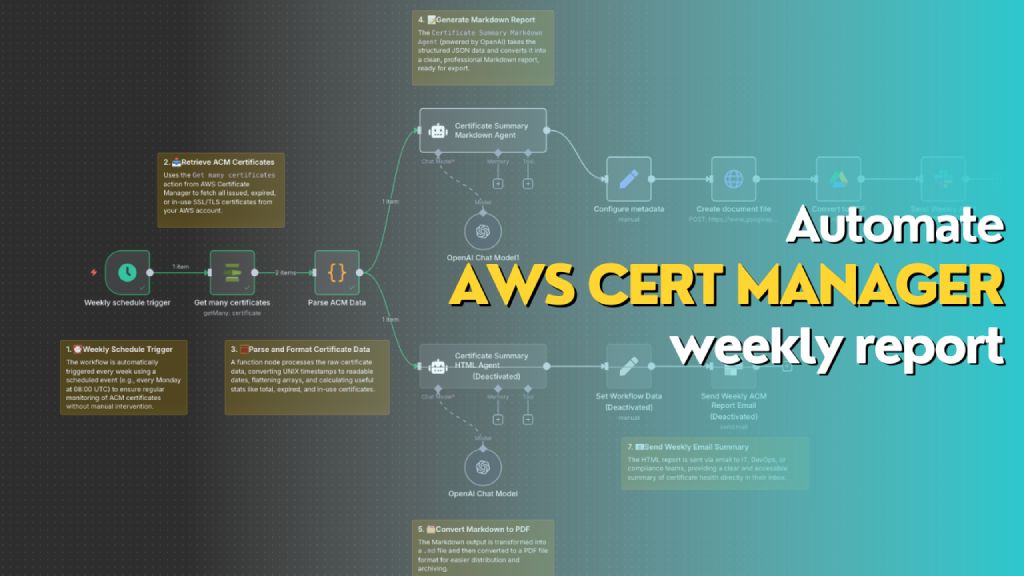 > Automatically generates a weekly report of all AWS ACM certificates, including status, expiry dates, and renewal eligibility. The workflow formats the data into both Markdown (for PDF export to Slack) and HTML (for email summary), helping teams stay on top of certificate compliance and expiration risks.
Who’s it for
This workflow is designed for DevOps engineers, cloud administrators, and compliance teams who manage AWS infrastructure and need automated weekly visibility into the status of their SSL/TLS certificates in AWS Certificate Manager (ACM). It's ideal for teams that want to reduce the risk of expired certs, track renewal eligibility, and maintain reporting for audit or operational purposes.
How it works / What it does
This n8n workflow performs the following actions on a weekly schedule:
- Trigger: Automatically runs once a week using the
Weekly schedule trigger. - Fetch Certificates: Uses
Get many certificatesaction from AWS Certificate Manager to retrieve all certificate records. - Parse Data: Processes and reformats certificate data (dates, booleans, SANs, etc.) into a clean JSON object.
- Generate Reports:
- 📄 Markdown Report: Uses the
Certificate Summary Markdown Agent(OpenAI) to generate a Markdown report for PDF export. - 🌐 HTML Report: Uses the
Certificate Summary HTML Agentto generate a styled HTML report for email.
- 📄 Markdown Report: Uses the
- Deliver Reports:
- Converts Markdown to PDF and sends it to Slack as a file.
- Sends HTML content as a formatted email.
How to set up
-
Configure AWS Credentials in n8n to allow access to AWS ACM.
-
Create a new workflow and use the following nodes in sequence:
Schedule Trigger: Weekly (e.g., every Monday at 08:00 UTC)AWS ACM → Get many certificatesFunction Node → Parse ACM Data: Converts and summarizes certificate metadataOpenAI Chat Node (Markdown Agent)with a system/user prompt to generate MarkdownConfigure Metadata→ Define file name and MIME type (.md)Create document file→ Converts Markdown to document streamConvert to PDFSlack Node→ Upload the PDF to a channel- (Optional) Add a second
OpenAI Chat Nodefor generating HTML and sending it via email
-
Connect Output:
- Markdown report → Slack file upload
- HTML report → Email node with embedded HTML
Requirements
- 🟩 n8n instance (self-hosted or cloud)
- 🟦 AWS account with access to ACM
- 🟨 OpenAI API key (for ChatGPT Agent)
- 🟥 Slack webhook or OAuth credentials (for file upload)
- 📧 Email integration (e.g., SMTP or SendGrid)
- 📝 Permissions to write documents (Google Drive / file node)
How to customize the workflow
- Change report frequency: Adjust the
Weekly schedule triggerto daily or monthly as needed. - Filter certificates:
- Modify the function node to only include
EXPIRED,IN_USE, orINELIGIBLEcerts. - Add tags or domains to include/exclude.
- Modify the function node to only include
- Add visuals: Enhance the HTML version with colored rows, icons, or company branding.
- Change delivery channels:
- Replace Slack with Microsoft Teams, Discord, or Telegram.
- Send Markdown as email attachment instead of PDF.
- Integrate ticketing:
- Create a JIRA/GitHub issue for each certificate that is
EXPIREDorINELIGIBLE.
- Create a JIRA/GitHub issue for each certificate that is
AWS ACM Certificate Expiry Report Generator with AI for Slack/Email
This n8n workflow automates the process of generating reports on expiring AWS ACM (Amazon Certificate Manager) SSL/TLS certificates and delivering these reports to Slack and/or email, with AI-powered summaries.
It simplifies certificate management by proactively notifying stakeholders about upcoming certificate expirations, helping to prevent service outages due to expired certificates.
What it does:
- Schedules Execution: Runs on a predefined schedule (e.g., daily, weekly) to check for expiring certificates.
- Lists ACM Certificates: Connects to AWS Certificate Manager to retrieve a list of all SSL/TLS certificates.
- Filters Expiring Certificates: Processes the retrieved certificates to identify those expiring within a specified timeframe (e.g., 30 days).
- Generates AI Summary: Uses an OpenAI Chat Model and an AI Agent to generate a concise, human-readable summary of the expiring certificates, highlighting critical information.
- Formats Report: Structures the certificate data and AI summary into a clear and informative report.
- Delivers to Slack: Posts the generated report to a specified Slack channel.
- Sends Email Notification: Optionally sends the report via SendGrid to a list of email recipients.
- Logs to Google Drive: Optionally saves the report as a file in Google Drive for archival or further analysis.
Prerequisites/Requirements:
- n8n Instance: A running n8n instance.
- AWS Account: Configured with credentials for AWS Certificate Manager (ACM) to list certificates.
- OpenAI API Key: For the OpenAI Chat Model to generate AI summaries.
- Slack Account: With an incoming webhook or bot token configured for posting messages.
- SendGrid Account: If email notifications are desired.
- Google Drive Account: If reports need to be saved to Google Drive.
Setup/Usage:
- Import the workflow: Download the JSON provided and import it into your n8n instance.
- Configure Credentials:
- AWS: Set up your AWS credentials with permissions for
acm:ListCertificatesandacm:DescribeCertificate. - OpenAI: Provide your OpenAI API Key.
- Slack: Configure your Slack credential (OAuth or Webhook).
- SendGrid: Set up your SendGrid API key credential.
- Google Drive: Configure your Google Drive credential (OAuth).
- AWS: Set up your AWS credentials with permissions for
- Customize Nodes:
- Schedule Trigger: Adjust the schedule to your desired frequency (e.g., daily at a specific time).
- AWS Certificate Manager: Ensure the region is correctly set.
- Code Node (Filtering): Modify the JavaScript code if you need to change the expiry threshold or filtering logic.
- AI Agent / OpenAI Chat Model: Adjust the prompt for the AI summary if needed.
- Slack: Specify the channel ID and any custom message formatting.
- SendGrid: Enter the sender email, recipient emails, and customize the email subject and body.
- Google Drive: Specify the folder path and filename for the generated reports.
- Activate the workflow: Once configured, activate the workflow to start monitoring your certificates.
Related Templates
Create personalized email outreach with AI, Telegram bot & website scraping
Demo Personalized Email This n8n workflow is built for AI and automation agencies to promote their workflows through an interactive demo that prospects can try themselves. The featured system is a deep personalized email demo. --- 🔄 How It Works Prospect Interaction A prospect starts the demo via Telegram. The Telegram bot (created with BotFather) connects directly to your n8n instance. Demo Guidance The RAG agent and instructor guide the user step-by-step through the demo. Instructions and responses are dynamically generated based on user input. Workflow Execution When the user triggers an action (e.g., testing the email demo), n8n runs the workflow. The workflow collects website data using Crawl4AI or standard HTTP requests. Email Demo The system personalizes and sends a demo email through SparkPost, showing the automation’s capability. Logging and Control Each user interaction is logged in your database using their name and id. The workflow checks limits to prevent misuse or spam. Error Handling If a low-CPU scraping method fails, the workflow automatically escalates to a higher-CPU method. ⚙️ Requirements Before setting up, make sure you have the following: n8n — Automation platform to run the workflow Docker — Required to run Crawl4AI Crawl4AI — For intelligent website crawling Telegram Account — To create your Telegram bot via BotFather SparkPost Account — To send personalized demo emails A database (e.g., PostgreSQL, MySQL, or SQLite) — To store log data such as user name and ID 🚀 Features Telegram interface using the BotFather API Instructor and RAG agent to guide prospects through the demo Flow generation limits per user ID to prevent abuse Low-cost yet powerful web scraping, escalating from low- to high-CPU flows if earlier ones fail --- 💡 Development Ideas Replace the RAG logic with your own query-answering and guidance method Remove the flow limit if you’re confident the demo can’t be misused Swap the personalized email demo with any other workflow you want to showcase --- 🧠 Technical Notes Telegram bot created with BotFather Website crawl process: Extract sub-links via /sitemap.xml, sitemap_index.xml, or standard HTTP requests Fall back to Crawl4AI if normal requests fail Fetch sub-link content via HTTPS or Crawl4AI as backup SparkPost used for sending demo emails --- ⚙️ Setup Instructions Create a Telegram Bot Use BotFather on Telegram to create your bot and get the API token. This token will be used to connect your n8n workflow to Telegram. Create a Log Data Table In your database, create a table to store user logs. The table must include at least the following columns: name — to store the user’s name or Telegram username. id — to store the user’s unique identifier. Install Crawl4AI with Docker Follow the installation guide from the official repository: 👉 https://github.com/unclecode/crawl4ai Crawl4AI will handle website crawling and content extraction in your workflow. --- 📦 Notes This setup is optimized for low cost, easy scalability, and real-time interaction with prospects. You can customize each component — Telegram bot behavior, RAG logic, scraping strategy, and email workflow — to fit your agency’s demo needs. 👉 You can try the live demo here: @emaildemobot ---
 By Michael A Putra
Sync Amazon Luna Prime games to Google Sheets with automatic updates
Amazon Luna Prime Games Catalog Tracker (Auto-Sync to Google Sheets) Automatically fetch, organize, and maintain an updated catalog of Amazon Luna – Included with Prime games.This workflow regularly queries Amazon’s official Luna endpoint, extracts complete metadata, and syncs everything into Google Sheets without duplicates. Ideal for: tracking monthly Prime Luna rotations keeping a personal archive of games monitoring new games appearing on Amazon Games / Prime Gaming, so you can instantly play titles you’re interested in building dashboards or gaming databases powering notification systems (Discord, Telegram, email, etc.) Overview Amazon Luna’s “Included with Prime” lineup changes frequently, with new games added and old ones removed.Instead of checking manually, this n8n template fully automates the process: Fetches the latest list from Amazon’s backend Extracts detailed metadata from the response Syncs the data into Google Sheets Avoids duplicates by updating existing rows Supports all major Amazon regions Once configured, it runs automatically—keeping your game catalog correct, clean, and always up to date. 🛠️ How the workflow works Scheduled Trigger Starts the workflow on a set schedule (default: every 5 days at 3:00 PM).You can change both frequency and time freely. HTTP Request to Amazon Luna Calls Amazon Luna’s regional endpoint and retrieves the full “Included with Prime” catalog. JavaScript Code Node – Data Extraction Parses the JSON response and extracts structured fields: Title Genres Release Year ASIN Image URLs Additional metadata The result is a clean, ready-to-use dataset. Google Sheets – Insert or Update Rows Each game is written into the selected Google Sheet: Existing games get updated New games are appended The Title acts as the unique identifier to prevent duplicates. ⚙️ Configuration Parameters | Parameter | Description | Recommended values | | --- | --- | --- | | x-amz-locale | Language + region | itIT 🇮🇹 · enUS 🇺🇸 · deDE 🇩🇪 · frFR 🇫🇷 · esES 🇪🇸 · enGB 🇬🇧 · jaJP 🇯🇵 · enCA 🇨🇦 | | x-amz-marketplace-id | Marketplace backend ID | APJ6JRA9NG5V4 🇮🇹 · ATVPDKIKX0DER 🇺🇸 · A1PA6795UKMFR9 🇩🇪 · A13V1IB3VIYZZH 🇫🇷 · A1RKKUPIHCS9HS 🇪🇸 · A1F83G8C2ARO7P 🇬🇧 · A1VC38T7YXB528 🇯🇵 · A2EUQ1WTGCTBG2 🇨🇦 | | Accept-Language | Response language | Example: it-IT,it;q=0.9,en;q=0.8 | | User-Agent | Browser-like request | Default or updated UA | | Trigger interval | Refresh frequency | Every 5 days at 3:00 PM (modifiable) | | Google Sheet | Storage output | Select your file + sheet | You can adapt these headers to fetch data from any supported country. 💡 Tips & Customization 🌍 Regional catalogs Duplicate the HTTP Request + Code + Sheet block to track multiple countries (US, DE, JP, UK…). 🧹 No duplicates The workflow updates rows intelligently, ensuring a clean catalog even after many runs. 🗂️ Move data anywhere Send the output to: Airtable Databases (MySQL, Postgres, MongoDB…) Notion CSV REST APIs BI dashboards 🔔 Add notifications (Discord, Telegram, Email, etc.) You can pair this template with a notification workflow.When used with Discord, the notification message can include: game title description or metadata the game’s image, automatically downloaded and attached This makes notifications visually informative and perfect for tracking new Prime titles. 🔒 Important Notes All retrieved data belongs to Amazon. The workflow is intended for personal, testing, or educational use only. Do not republish or redistribute collected data without permission.
 By Paolo Ronco
Generate professional email signatures in HTML & PDF with Gmail delivery
Dynamic Email Signature Creator (PDF + HTML) Create gorgeous, branded, professional email signatures automatically — from a simple POST request. This workflow turns user details into a premium HTML signature, converts it into PDF, and delivers it instantly via Gmail, along with a clean JSON response. --- ✨ What This Template Does This workflow automatically: Receives user details (name, role, email, phone, links) via Webhook Extracts & validates inputs Generates a modern, premium HTML signature with icons + layout Converts HTML → high-quality PDF using HTMLCSS → PDF service Emails both the HTML signature preview + PDF attachment to the user Returns a clean JSON success response with the pdf_url Works 100% automated — no manual designing needed Perfect for: HR onboarding Corporate identity management Personal branding Team signature standardization Automated client signature setup --- 🔥 Features Beautiful modern design Clean branding layout with icons (LinkedIn, Instagram, Website) Professional color palette + typography Auto-generated PDF (print-ready) Mobile-friendly & email-safe HTML Supports any social links Extremely easy to integrate with forms, portals, CRMs Fast: Signature generated in < 3 seconds --- 🧩 How It Works Webhook receives user information Input extractor formats the fields HTML template dynamically inserts user values HTML → PDF generator creates high-resolution output Email node sends signature + PDF Workflow responds with JSON (pdf_url, status, etc.) --- ⚙️ Setup Needed Connect these credentials in n8n: HTML → PDF (PDFMunk account) Gmail (for sending the final signature email) Update inside the HTML template: Brand colors Logo URL (optional) Social icon colors / links (optional) That’s it — your automated signature generator is live. --- 🏷️ Tags email-signature, branding, pdf-generator, html-template, gmail, automation, onboarding, corporate
 By Jitesh Dugar